
Aanchal Parmar
Product Marketing Manager, Flexprice
RunPod updated its published rate card on 27 July 2026. If you're working from a guide written before that, most of your numbers are wrong.
I checked every figure here against RunPod's pricing page and RunPod's docs on 18 August 2026, and I've marked what RunPod publishes against what it doesn't.
RunPod pricing hands you per-second control over GPU spend, which is genuinely good, and a meter with enough moving parts that people still get surprised. This isn't a copy of the rate card. It's how the billing logic behaves.
Key takeaways
Here's what changes how you budget, before any of the detail:
RunPod bills per second on every Pod tier, so a 16-minute job on a $1.99/hr GPU costs $0.53 instead of the full $1.99 an hourly-rounding provider would charge.
The Secure Cloud premium isn't a flat markup. It runs 11% on an L4 and 127% on an RTX 3090, because consumer cards carry a much steeper premium than data-centre cards.
Container disk stops costing money the moment your Pod stops, because RunPod erases it. Volume disk does the opposite and doubles to $0.20/GB a month while idle.
Serverless beats an always-on Pod only below roughly 60% utilisation on an H100 and 51% on an A100. Above that, keep the Pod running.
RunPod caps your spend at $80 an hour across all resources by default, and charges nothing for data ingress or egress.
Spot capacity still exists as an API flag, but RunPod publishes no spot rate anywhere. You can't build a budget on it from public figures.
What is RunPod
RunPod is a GPU cloud built for AI training and inference.
It sells compute four ways:
Pods for dedicated GPU instances
Serverless for inference that scales to zero
Clusters for multi-node jobs
Public Endpoints for hosted models you call by API
Every Pod runs in one of two tiers, Community Cloud or Secure Cloud, across thousands of GPUs in 30+ regions. RunPod bills per second, charges nothing for data transfer, passed $120 million in annual recurring revenue and 1 million developers in January 2026, and was independently verified against HIPAA and GDPR standards a month later.
How RunPod’s pricing model works
RunPod pricing depends on which product you're using, not just which GPU you pick. Compute bills per second while a Pod runs. Storage bills separately, monthly per gigabyte, with different rates depending on the storage type and whether your Pod is running. Data transfer costs nothing in either direction.
That three-part split is the thing to hold onto, because most surprise bills come from the second part while people are watching the first.
Three definitions worth fixing before the numbers start:
A Pod is a containerised virtual machine attached to a GPU. It's the default way to use RunPod.
A container disk is the local disk your Pod boots with. RunPod erases it when the Pod stops.
A network volume is persistent storage that outlives any single Pod and moves between them.
RunPod also runs on prepaid credits, and the credit rules catch people out more than the rates do. You need at least one hour's worth of credits for your chosen configuration before RunPod will deploy an on-demand instance.
When your balance reaches $0, RunPod stops your Pods: a Pod with a network volume attached stops and keeps its data, while a Pod without one gets terminated and that data is gone for good. Enable low balance notifications or auto-pay, and treat that distinction as the difference between an inconvenience and losing a training run.
One worked example, using a current rate. Launch an A100 PCIe 80GB Pod on Secure Cloud at $1.39/hr and run it for exactly two hours and 14 seconds. That's 7,214 seconds at $0.000386 a second, so RunPod bills you $2.79. No rounding up to three hours, and no minimum. This is pay-as-you-go pricing working the way the label promises, which is rarer than it should be.
RunPod GPU pricing: Community Cloud vs Secure Cloud
Every GPU you rent runs in one of two environments, and the same card costs meaningfully more in one than the other.
Community Cloud puts you on hardware from vetted third-party hosts across a distributed network. Secure Cloud puts you in data centre capacity RunPod operates itself, where availability is more predictable.
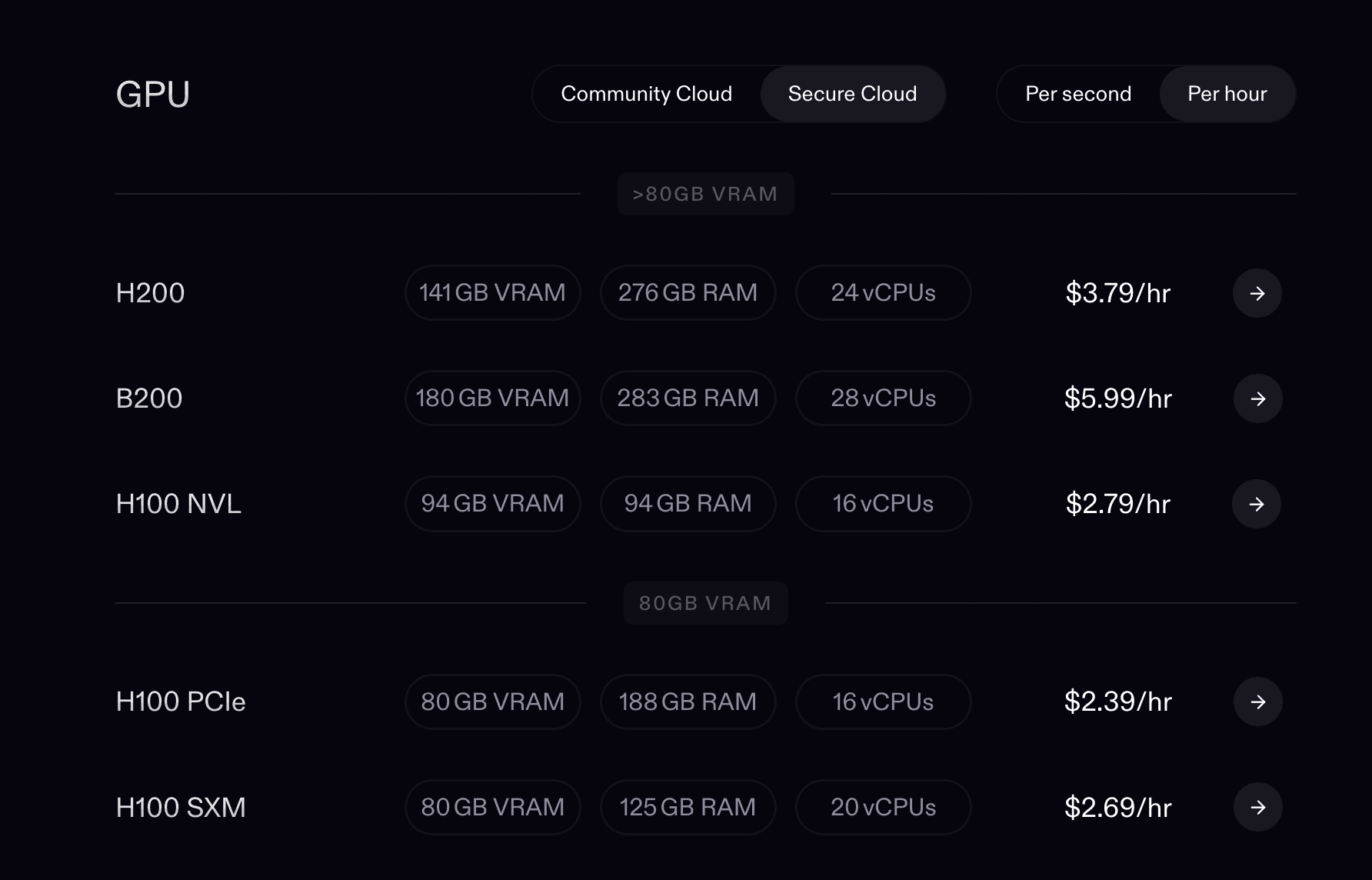
Here's the full RunPod GPU cloud pricing card, both tiers, verified 18 August 2026:
GPU | VRAM | Community $/hr | Secure $/hr | Secure premium |
B300 | 288GB | $6.94 | $7.89 | 14% |
B200 | 180GB | $5.98 | $6.79 | 14% |
H200 | 141GB | $3.59 | $4.59 | 28% |
RTX Pro 6000 | 96GB | $1.69 | $2.09 | 24% |
H100 NVL | 94GB | $2.59 | $3.19 | 23% |
H100 SXM | 80GB | $2.69 | $3.29 | 22% |
H100 PCIe | 80GB | $1.99 | $2.89 | 45% |
A100 SXM | 80GB | $1.39 | $1.59 | 14% |
A100 PCIe | 80GB | $1.19 | $1.39 | 17% |
L40S | 48GB | $0.79 | $0.99 | 25% |
RTX 6000 Ada | 48GB | $0.74 | $0.84 | 14% |
L40 | 48GB | $0.69 | $0.82 | 19% |
A40 | 48GB | $0.35 | $0.44 | 26% |
RTX A6000 | 48GB | $0.33 | $0.53 | 61% |
RTX 5090 | 32GB | $0.69 | $0.99 | 43% |
RTX 4090 | 24GB | $0.34 | $0.74 | 118% |
RTX 3090 | 24GB | $0.22 | $0.50 | 127% |
L4 | 24GB | $0.44 | $0.49 | 11% |
RTX A5000 | 24GB | $0.16 | $0.27 | 69% |
The premium column is mine, calculated from RunPod's two published rates. RunPod doesn't publish it, and the pattern in it is the most useful thing on this page.
How RunPod prices GPU configurations
RunPod prices the whole Pod spec, not just the GPU. That's the part most comparison tables miss, and it's why the same GPU name shows up at different prices across providers and inside RunPod itself.
Take the four separate 80GB SKUs on the card above. Ask for the RunPod A100 80GB price per hour and there are two answers, because A100 PCIe costs $1.39 on Secure Cloud and A100 SXM costs $1.59. The H100 80GB pair does the same thing at $2.89 and $3.29. Same memory, different price, because you're paying for the interconnect and the CPU and RAM bundled with it.
SXM variants use NVLink, which gives you far more bandwidth between GPUs and better multi-GPU scaling. PCIe variants cost less and move data more slowly. For single-GPU inference where you're not saturating the bus, PCIe is fine and you're overpaying for SXM. For distributed training across several cards, the SXM premium buys you real throughput, and paying 14% more to avoid a bandwidth bottleneck is an easy trade.
The vCPU and RAM allocations differ too, and RunPod publishes them next to each rate. An H100 PCIe comes with 16 vCPUs and 188GB of RAM. An A100 PCIe comes with 8 vCPUs and 117GB. If your pipeline does heavy CPU-side preprocessing, that gap matters as much as the GPU.
What about RunPod CPU pricing?
RunPod prices CPU pods per vCPU, and it doesn't publish the rates on its pricing page. You pick a CPU flavour and a vCPU count, and RunPod derives the memory from that flavour's RAM multiplier, so the vCPU is the billable unit.
I want to be precise here because it's the one number in this article I can't pull from a rate card. RunPod's catalog API returns a price object per flavour with two fields, one for secure and one for serverless, and the documented example shows a Gen 3 Compute-Optimized flavour scaling from 2 to 32 vCPUs at 2.5GB of RAM per vCPU, priced at $0.04 per vCPU for secure and $0.03 for serverless.
That's an example payload in API docs, not a published price. For live CPU rates, call GET /v2/catalog/cpus or check the console during deployment. It's a strange gap in an otherwise transparent rate card, and if you're sizing a CPU-heavy preprocessing tier, don't plan around the docs example.
RunPod serverless pricing
RunPod Serverless bills per second of active execution and charges nothing while no request runs. Flex worker rates start at $0.58 an hour for a 16GB class GPU and reach $9.98 for a B300. That scale-to-zero behaviour is the entire reason to accept an active rate roughly 65% above the equivalent Pod.
Current serverless flex worker rates, verified 18 August 2026:
Class | GPUs in the class | Flex $/hr |
280GB | B300 | $9.98 |
180GB | B200 | $8.64 |
141GB | H200 | $5.93 |
96GB | RTX 6000 Pro | $3.49 |
80GB | H100 | $4.79 |
80GB | A100 | $2.72 |
48GB | L40, L40S, 6000 Ada, MIG 48GB | $1.75 |
48GB | A6000, A40 | $1.22 |
32GB | RTX 5090 | $1.58 |
32GB | RTX PRO 4500 Blackwell | $1.15 |
24GB | RTX 4090 | $1.10 |
24GB | L4, A5000, 3090, MIG 24GB | $0.69 |
16GB | A4000, A4500, RTX 4000, RTX 2000 | $0.58 |
RunPod claims this saves you 25% over other serverless GPU providers on flex workers alone. Reservations exist for both active and flex workers at a discount, priced by talking to their sales team rather than published.
RunPod storage and network volume pricing
Storage is where RunPod bills quietly, and it's the section of the rate card most guides get wrong. There are four storage types, not two, and one of them behaves in the opposite direction to what most people assume.
Verified against RunPod's Pod pricing docs, 18 August 2026:
Storage type | Running Pod | Stopped Pod | Behaviour |
Container disk | $0.10/GB/month | Not charged | Temporary, erased when the Pod stops |
Volume disk | $0.10/GB/month | $0.20/GB/month | Persistent, retained until you delete the Pod |
Network Storage Standard, under 1TB | $0.07/GB/month | $0.07/GB/month | Permanent, portable between Pods |
Network Storage Standard, over 1TB | $0.05/GB/month | $0.05/GB/month | Permanent, portable between Pods |
Network Storage High-Performance | $0.14/GB/month | $0.14/GB/month | Permanent, faster tier |
Read that first row carefully, because it's the opposite of what circulates online. Container disk costs you nothing once the Pod stops, since RunPod deletes it. Stopping a Pod doesn't leave a container disk quietly billing in the background, it destroys your data.
The cost controls RunPod gives you
RunPod ships three cost controls that barely get discussed, and all three change how you plan.
Your account carries a default spend limit of $80 an hour across all resources, raised only by contacting support.
That's a real ceiling on a runaway script, and I'd guess most teams have never looked at it. Worth checking before you plan a large cluster job that would breach it.
RunPod charges nothing for data ingress or egress. Not a discounted rate, nothing. If you're moving model weights and datasets in and out repeatedly, that removes a line item that would dominate the same workload on a hyperscaler.
Storage isn't billed while the host machine is unavailable, so you're not paying for capacity you can't reach.
What RunPod actually costs per million tokens
Dollars per GPU-hour isn't the unit anyone budgets in. If you're serving inference, you care about cost per million tokens, and converting between the two takes one formula:
Cost per million tokens = (1,000,000 / tokens per second) / 3,600 x hourly rate
Serve a 70B model with vLLM at roughly 1,200 tokens a second and a million tokens takes about 0.23 GPU-hours.
On an H100 PCIe that's $0.46 per million tokens on Community Cloud and $0.67 on Secure.
Move the same workload to serverless at $4.79 an hour and it's $1.11.
Throughput dominates that result, which is the trap. A cheaper GPU that serves half the tokens per second costs you more per million, so the rate card alone can't tell you which card is cheapest for your model.
Benchmark your own throughput before you optimize the hourly rate, and if you want to compare what different tools show you about that spend, we've reviewed the AI cost tracking tools worth using.
When RunPod pricing works best
RunPod isn't the cheapest or the simplest GPU cloud, and it's one of the most configurable. If you understand the meter, you can get real value out of it.
It works best in four situations:
Bursty or variable workloads, where per-second billing means a short inference job or a testing environment costs what it used, not a rounded-up hour.
Teams optimising for dollars per unit of throughput rather than for simplicity, who'll compare vCPU, RAM and VRAM configurations to find the cheapest viable spec.
Teams that want current hardware without an enterprise contract. B300, H200 and RTX Pro 6000 all sit on the on-demand card with no minimum commitment.
Teams already handling state persistence, with checkpoints going to network volumes or object storage, who can therefore tolerate interruptible capacity.
Scale here is real, for what it's worth. Civitai told RunPod it trains over 800,000 LoRAs a month on 500-plus concurrent GPUs, which is a useful reference point when you're wondering whether a platform will hold up.
Your requirement | Recommended setup |
Short inference API, under 60% utilisation | Serverless, 24GB or 48GB class |
Continuous inference API, above 60% utilisation | Secure Cloud Pod, on-demand, network volume attached |
Training a 7B model overnight | A100 or H100 on Community Cloud with checkpointing |
Multi-GPU distributed training | H100 SXM or A100 SXM for the NVLink bandwidth |
Repeating workloads, 12+ hours a day for months | Savings plan on the GPU class you'll keep using |
Budget testing and benchmarking | RTX 3090 or 4090 on Community Cloud, never Secure |
Multi-node jobs up to 64 GPUs | Clusters, no commitment |
Calling a common model by API | Public Endpoints, skip Pods entirely |
What to do next
Pull the current rates yourself before you commit anything. RunPod's rate card moves, this one carries an August 2026 date, and any guide including this one is a snapshot.
Then do three things. Check your account's $80 hourly spend limit against the largest job you plan to run. Audit your volume disks for anything idle that's billing at $0.20 a gigabyte. And run the utilisation division on your inference endpoints before you assume serverless is the cheaper option, because the break-even sits lower than most teams expect.
If you're reselling that compute, the harder problem starts after the GPU bill arrives. Read the metering and credits documentation at docs.flexprice.io, or run the open source build yourself and see how the events land.
How much does RunPod cost per hour?
What's the difference between RunPod Community Cloud and Secure Cloud?
Does RunPod charge for storage when a Pod is stopped?
How does RunPod serverless pricing work?